
GSTR-3B Filing Blocked? Fix “Tax Liability Breakup in GSTR-3B” Issue (GSTN Advisory March 2026)
Tax Liability Breakup GSTR-3B is now a mandatory step introduced by GSTN from the February 2026 tax period, and this is the primary reason why many taxpayers are unable to proceed with GSTR-3B filing.
GSTN has issued an advisory dated 16 March 2026 for "Tax Liability Breakup in GSTR-3B", clarifying that from the February 2026 tax period onwards, taxpayers must open the “Tax Liability Breakup, As Applicable” tab on the payment page and click “SAVE” before filing the return.
This requirement is currently being triggered even in cases where there is no previous period liability. That makes it both a filing bottleneck and an important compliance checkpoint under the evolving GST return system.
The Tax Liability Breakup GSTR-3B tab is auto-populated based on GSTR-1 and GSTR-1A data, making it critical for accurate reporting.
Quick Answer – Why GSTR-3B Is Not Filing
If the “Proceed to File” button is disabled, you likely have not completed the “Tax Liability Breakup, As Applicable” confirmation step on the GSTR-3B payment page.
What you need to do immediately:
- Go to the GSTR-3B payment page
- Click “Tax Liability Breakup, As Applicable”
- Review or edit the values, if required
- Click “SAVE”
- Then proceed to file using EVC or DSC
Important: At present, this step is being required for all taxpayers during the current portal cycle.
GSTN Advisory – What Has Changed?
GSTN has clarified that from the February 2026 tax period onwards, the portal will auto-populate the “Tax Liability Breakup, As Applicable” tab in GSTR-3B based on document dates reported in GSTR-1, GSTR-1A, and IFF.
This breakup is meant to identify cases where the supply belongs to a previous tax period, but the related tax liability is being discharged in the current tax period’s GSTR-3B.
In practical terms, GSTN is now asking taxpayers to confirm the period-wise classification of tax liability before filing the return.
- The breakup is auto-populated by the portal
- The taxpayer must review or edit it, if needed
- The taxpayer must click “SAVE” before filing through EVC or DSC
Why Tax Liability Breakup GSTR-3B is Blocking Filing ?
The immediate reason is a new portal-level validation introduced on the payment page.
Even after liability is offset, the GST portal may keep the “Proceed to File” button inactive until the taxpayer opens the “Tax Liability Breakup, As Applicable” tab and clicks “SAVE”.
Until this tab is opened and saved, filing may remain blocked.
GSTN has also acknowledged that this confirmation should ideally be mandatory only where previous period liability exists. However, at present, the portal is requiring this action in all cases, including those where liability relates only to the current tax period.
Where to Find the Tax Liability Breakup Button in GSTR-3B
The “Tax Liability Breakup, As Applicable” option is available on the GSTR-3B payment page.
- It appears after offsetting liability
- It is visible near the bottom-right area of the payment screen
- It appears close to the “Proceed to File” button
This is a newly introduced tab or button on the filing interface and should not be ignored during return filing.
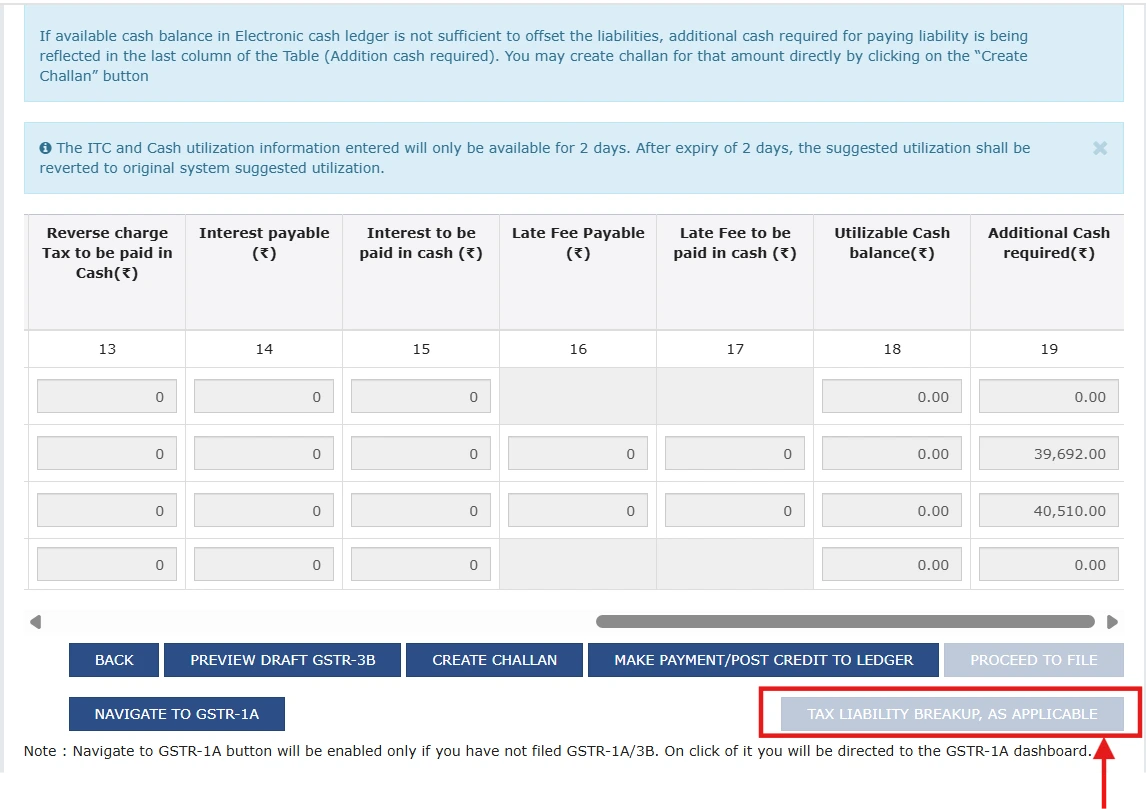
Tax Liability Breakup, As Applicable button visible on the GSTR-3B payment page before filing.
Important filing note: If the breakup tab is not opened and saved, the “Proceed to File” button may remain disabled even when the rest of the return appears complete.
Step-by-Step Fix: How to File GSTR-3B Successfully
Follow this sequence on the GST portal after completing tax payment or liability offset:
- Complete liability offset in GSTR-3B as usual.
- Go to the payment page.
- Click “Tax Liability Breakup, As Applicable”.
- Check the auto-populated values carefully.
- Edit the breakup if required.
- Click “SAVE” inside the tab.
- Proceed to file the return through EVC or DSC.
Before filing, ensure that the Tax Liability Breakup GSTR-3B details are reviewed and saved correctly.
This is the interim procedure taxpayers should follow until the issue is resolved by GSTN.
Section 50 Impact – Why This Step Matters
GSTN has linked this requirement to Section 50 of the CGST Act, 2017, which deals with interest on delayed payment of tax.
Where tax liability pertaining to an earlier tax period is discharged in a later tax period, interest may become payable.
The proviso to Section 50(1) is especially important because interest on a net cash basis is allowed only in specific situations, including timely filing conditions.
By capturing the tax period to which liability actually belongs, the portal is building a stronger data trail to determine whether liability was genuinely delayed, merely reported late, or amended later through return correction mechanisms.
In other words, this field may influence future interest determination and compliance review.
Important Compliance Warning
Clicking “SAVE” is not merely a portal formality. It confirms the period-wise classification of liability reflected in GSTR-3B.
This information may become relevant for:
- interest determination under Section 50,
- portal-level reconciliation checks, and
- backend compliance and risk assessment.
This Is Also an Automated Reconciliation Tool
This is not just a filing step. It is a system-level reconciliation mechanism.
The portal is now using document dates from GSTR-1, GSTR-1A, and IFF to determine whether liability being paid in the current GSTR-3B actually belongs to an earlier tax period.
In effect, the GST system is connecting:
- document date,
- reporting period, and
- actual discharge of tax liability.
This is a major shift toward more system-driven compliance validation on the portal.
How GSTR-1A Can Trigger the Tax Liability Breakup
One of the most important practical triggers for this breakup is GSTR-1A.
If a taxpayer amends or adds an invoice in GSTR-1A for the current month, but the underlying document date belongs to a previous tax period, the portal may classify that liability as a previous period liability being discharged now.
Example: An invoice amended in February through GSTR-1A with a January document date may populate the breakup in the February GSTR-3B.
As a result, the Tax Liability Breakup table can auto-populate even when the taxpayer did not originally expect any prior-period impact.
Could This Lead to Automated Interest Calculation?
This advisory also signals a likely future direction in GST return architecture.
This could shift GST interest from self-assessment toward system-assisted assessment.
Once the portal begins reliably capturing period-wise liability discharge, this data may be used for more automated treatment of interest on delayed payment rather than leaving the matter entirely to taxpayer self-assessment.
For businesses and professionals, this means the quality of period classification in returns will become far more important than before.
Checklist Before Clicking SAVE
Review these points before confirming portal data:
- Match it with your GSTR-1 vs GSTR-3B reconciliation
- Check whether any invoices were reported late
- Review recent changes made through GSTR-1A
- Verify whether IFF reporting has created prior-period impact
- Confirm whether credit notes have affected the breakup
- Edit any incorrect figures before clicking “SAVE”
If the portal auto-populates the breakup incorrectly and it is saved without review, it may create avoidable compliance complications later.
Special Cases to Watch
- Even if there is no previous period liability, you may still need to open the tab and click SAVE.
- Negative values due to credit notes: Taxpayers should verify whether the portal accepts such values correctly during the current filing cycle.
- Edited values: If you reduce or modify the auto-populated amount, ensure the change is fully supportable by your records and reconciliations.
These cases deserve extra attention because portal behavior may evolve while GSTN resolves the current issue.
Part of GST Portal Reform and Data-Clean Compliance
This change appears to be part of a broader move toward cleaner return data and stronger portal intelligence.
By forcing liability classification at the filing stage itself, GSTN can reduce ambiguity between return reporting and actual tax discharge. Over time, such changes may help reduce mismatches, improve automated validations, and support more targeted compliance monitoring.
That is why taxpayers should treat this field as a compliance-sensitive confirmation, not a routine click.
Frequently Asked Questions
Official GSTN Advisory Reference
Source: GSTN advisory dated 16 March 2026 regarding confirmation of “Tax Liability Breakup, As Applicable” in GSTR-3B.
Avoid Filing Errors & Interest Risks with TaxPower GST
Stop struggling with last-minute GSTR-3B issues. TaxPower GST helps you identify mismatches, detect delayed liabilities, and file returns with complete confidence.
From GSTR-1 vs GSTR-3B reconciliation to compliance-focused automation, stay ahead of GST portal validations.
Conclusion
The new “Tax Liability Breakup, As Applicable” confirmation is now an important step in GSTR-3B filing. For now, taxpayers should treat it as a mandatory interim requirement and ensure the tab is opened and saved before filing to avoid GSTR-3B filing being blocked.
This is not only a portal usability issue. It also reflects a broader compliance shift toward period-wise liability tracking, stronger reconciliation, and closer linkage between return reporting and interest implications.
Understanding and correctly confirming the Tax Liability Breakup GSTR-3B is now essential to avoid filing disruptions and future compliance risks.
TaxPower GST Expert Insight
This article is prepared by the TaxPower GST Team based on official GSTN advisories, practical filing experience, and real-world compliance scenarios faced by businesses and tax professionals.
Our focus is not just on explaining updates, but on helping you avoid filing errors, reduce compliance risks, and handle GST portal changes with confidence.
For regular GST updates, compliance guidance, and practical filing solutions, follow TaxPower GST and stay ahead of regulatory changes.
Disclaimer:
This article is intended for general informational purposes only and is based on the GSTN advisory available as on the date of publication. While reasonable care has been taken to ensure accuracy, the content should not be construed as legal, tax, or professional advice.
Tax laws and portal functionalities are subject to change, and their application may vary based on specific facts and circumstances. Readers are advised to refer to official GST notifications, circulars, and the GST portal, or consult a qualified tax professional or chartered accountant before taking any action.
TaxPower GST shall not be responsible for any loss or consequences arising from reliance on this information.